Notifications
Notifications is set up via the integration settings.
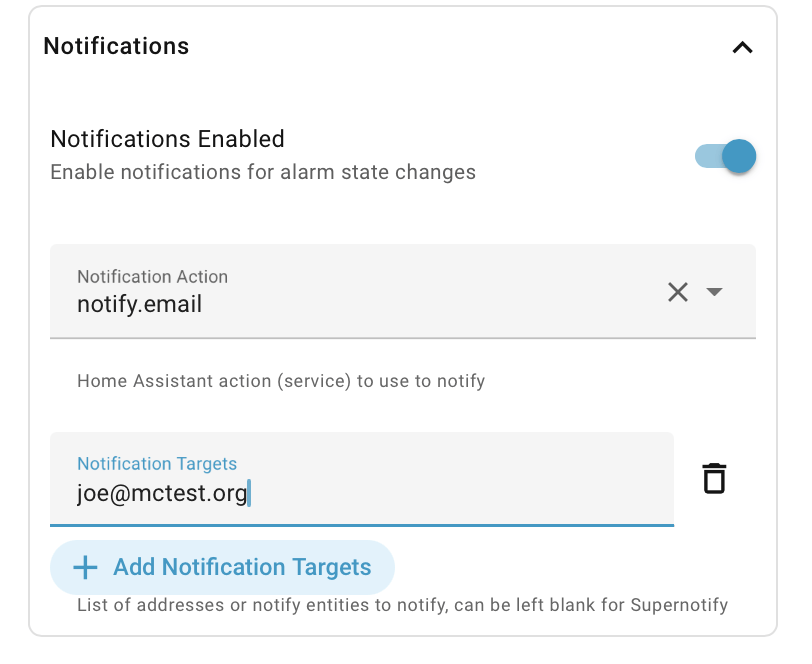
Two notifications are sent:
- Alarm status has changed, by any means
- A button has been pressed, and the arm status will be actioned with a few seconds delay
Basic Notification
If Supernotify is not installed then only the standard Home Assistant Send Message is supported, which offers only a message to a configured Notify Entity.
Supernotify
If Supernotify is installed, its supernotify.notify action is offered first in the Notification Action list, and is preselected on new installs have it already selected.
It offers:
- Mobile Actions to disarm, reset or arm away from pop-up actions on the mobile app notification.
- Automatic targets - leave the targets blank to let Supernotify choose who to notify based on its auto-discovery of mobile apps
- Defined targets - Add targets from a list of Home Assistant notifiable entities, selectors like area or label, email addresses or other types like
discordor SMS numbers that Supernotify can be configured for. - Voice notifications - using Alexa devices, or the
ttsintegration - Delivery choice - custom select which deliveries you want, from a list populated automatically from what the local Supernotify can do
- Automatic selection of Supernotift scenarios
Priority
- Priority can be set separately for three kinds of change
- Scheduled changes - Times of the Day sensor, calendar, sunrise or sunset,
lowunless changed - Occupancy changes - people arriving or leaving,
mediumunless changed - Manual changes - alarm panel, button, mobile action or voice,
mediumunless changed
- Scheduled changes - Times of the Day sensor, calendar, sunrise or sunset,
Scenarios
Scenarios are automatically sent for each notification, which a name based on the new alarm state and an autoarm- prefix, such as autoarm-armed_away or autoarm-disarmed. For convenience, all armed states all supply a autoarm-armed scenario.
Define any of these as Supernotify Scenarios to tune the deliveries, sounds, actions or wording for that state, the ones not defined there are ignored
Mobile Actions
Mobile Actions have their titles in the Home Assistant language, and leave out any that would do nothing, so there's no Disarm when the alarm has just been disarmed, nor Arm Away when it has just been armed away
YAML Notification Configuration
This is a left-over from when everything was in YAML, and is now deprecated. The details are in the advanced configuration.